Before you start
Link to “Before you start”You need three things: Claude Code and Codex, your own account, and a project folder.
Claude Code and Codex, signed in
Crosstalk supports Claude Code, Codex, Gemini, Kimi and DeepSeek. In this build, opening a new room requires both Claude Code and Codex to start successfully; add the other agents through Setup.
Your own account
Your own provider account and usage allowance. Crosstalk does not include model access. Agent conversations, including handoffs and automatic compatibility checks, can use your allowance.
A project folder
For your first editing task, use a disposable Git repository. Git is needed for Undo, parallel tasks and the Git panel.
The desktop installer includes its application runtime. Each agent’s CLI may have its own requirements.
Install and sign in to the agents
Claude Code and Codex are needed to open a room in this build. Add Gemini, Kimi or DeepSeek through Setup once a room is open.
Claude Code
Install Claude Code, then run claude once to sign in.
Codex
Install the Codex CLI, then run codex login.
Gemini
Gemini uses the Antigravity CLI. Install it, then run agy once to sign in.
Windows, in PowerShell
irm https://antigravity.google/cli/install.ps1 | iexmacOS, in Terminal
curl -fsSL https://antigravity.google/cli/install.sh | bashDeepSeek or Kimi
Both run on Kimi Code. Install it, then add your key or sign in from Crosstalk’s Setup. On Windows, Kimi Code also needs Git for Windows.
Windows, in PowerShell
irm https://code.kimi.com/kimi-code/install.ps1 | iexmacOS, in Terminal
curl -fsSL https://code.kimi.com/kimi-code/install.sh | bashInstall
Link to “Install”Choose the installer for your operating system and, on a Mac, your processor.
Windows has one x64 installer; macOS has separate builds for Apple Silicon and Intel. Get the one you need from the download page, which also lists each file’s SHA-256 checksum.
The Windows installer isn’t code-signed yet and the Mac app isn’t notarized yet, so your system may warn you the first time. Here’s what to choose. Don’t turn off your operating system’s protections to run Crosstalk.
On Windows
Keep the download
If Edge says the file isn’t commonly downloaded and you trust the download source, open the download’s … menu, then choose Keep , then Show more , then Keep anyway. Once it finishes downloading, check its SHA-256 checksum before opening it.
Open the installer
The Windows installer isn’t code-signed yet, so SmartScreen may say “Windows protected your PC”. If you trust the source and the checksum matches, choose More info, then Run anyway if that option is available. If it isn’t, report the block.
If Smart App Control blocks it
There’s no per-app override. Don’t turn Smart App Control off; report it instead.
If anything else looks different
If you see a publisher you don’t expect, or a message that isn’t described here, stop and report it.
On macOS
Install it
Open the
.dmg, drag Crosstalk to Applications, then open Crosstalk from Applications, not from the disk image.If macOS blocks it
The Mac app isn’t notarized yet, so macOS may say that Apple cannot verify the developer or check the app for malware. If you trust the source and the installer’s checksum matches, try opening Crosstalk once, then go to System Settings , then Privacy & Security and choose Open Anyway if available. Confirm Open when prompted. If the option isn’t available, report the block.
If macOS says the app is damaged
Stop and download the installer again from the releases page. Compare its SHA-256 checksum with the listed checksum before reinstalling. If the warning returns, report it with the exact message and your macOS version.
Keep your protections on
Don’t turn off your Mac’s security settings to open Crosstalk. If you see a message that isn’t described here, stop and report it.
Your first room
Link to “Your first room”Start with a read-only question, then bring in a second agent.
Install and open Crosstalk
Install the build for your operating system and processor, then open Crosstalk.
Get Claude Code and Codex ready
Follow setup to get Claude Code and Codex ready and choose a project folder. If an agent is missing or signed out, follow its specific next step and choose Check again.
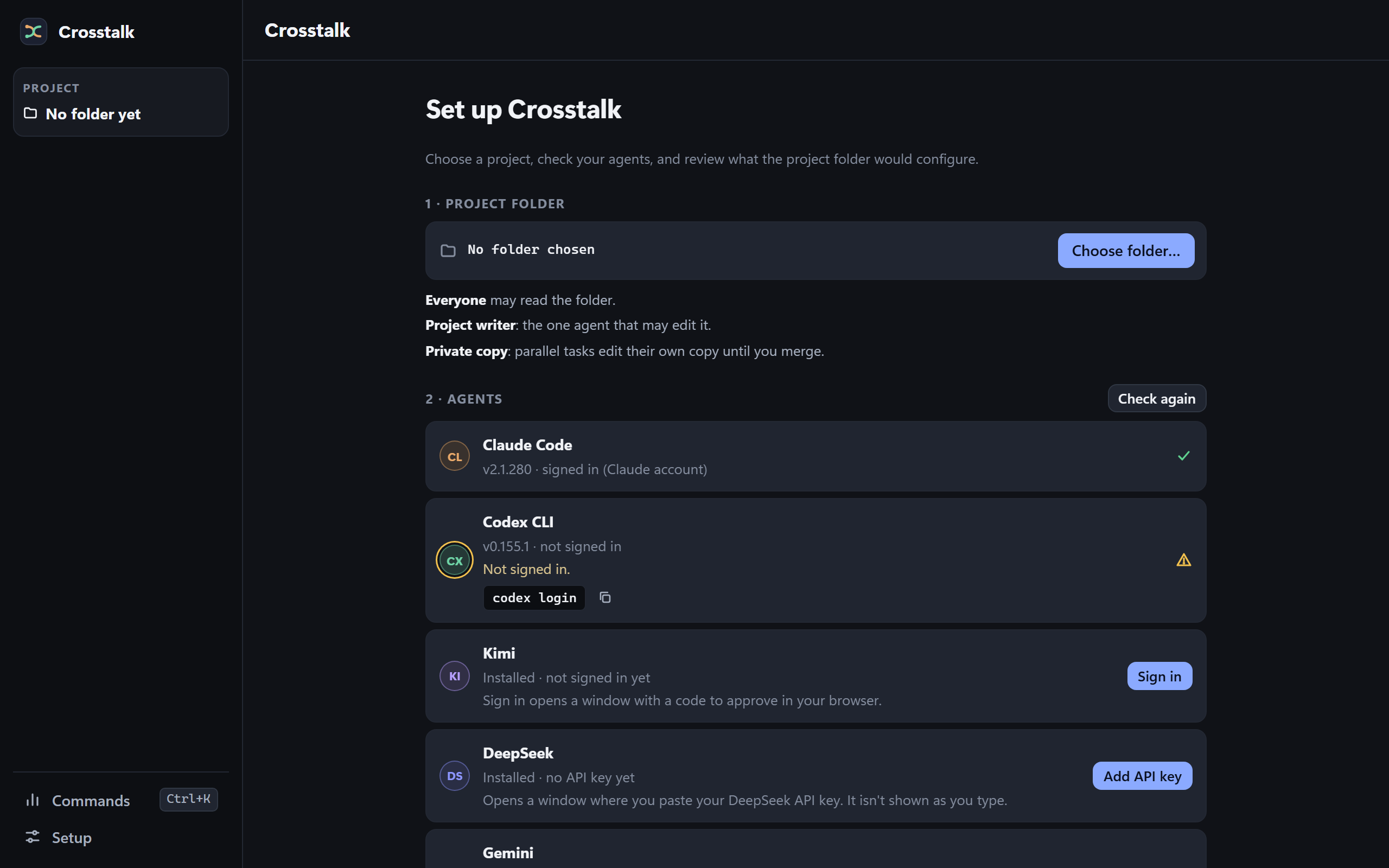
Sample dataSetup: a project folder, then the agents and what each still needs. Ask for a summary
Select one of them and ask:
ToYour agent Read this project's README and summarize what it does. Do not edit files or run commands.
Bring in a reviewer
Add the second agent when you are ready. Ask Claude:
ToClaude Ask @codex for one improvement to this README, then summarize its answer. Do not change files.
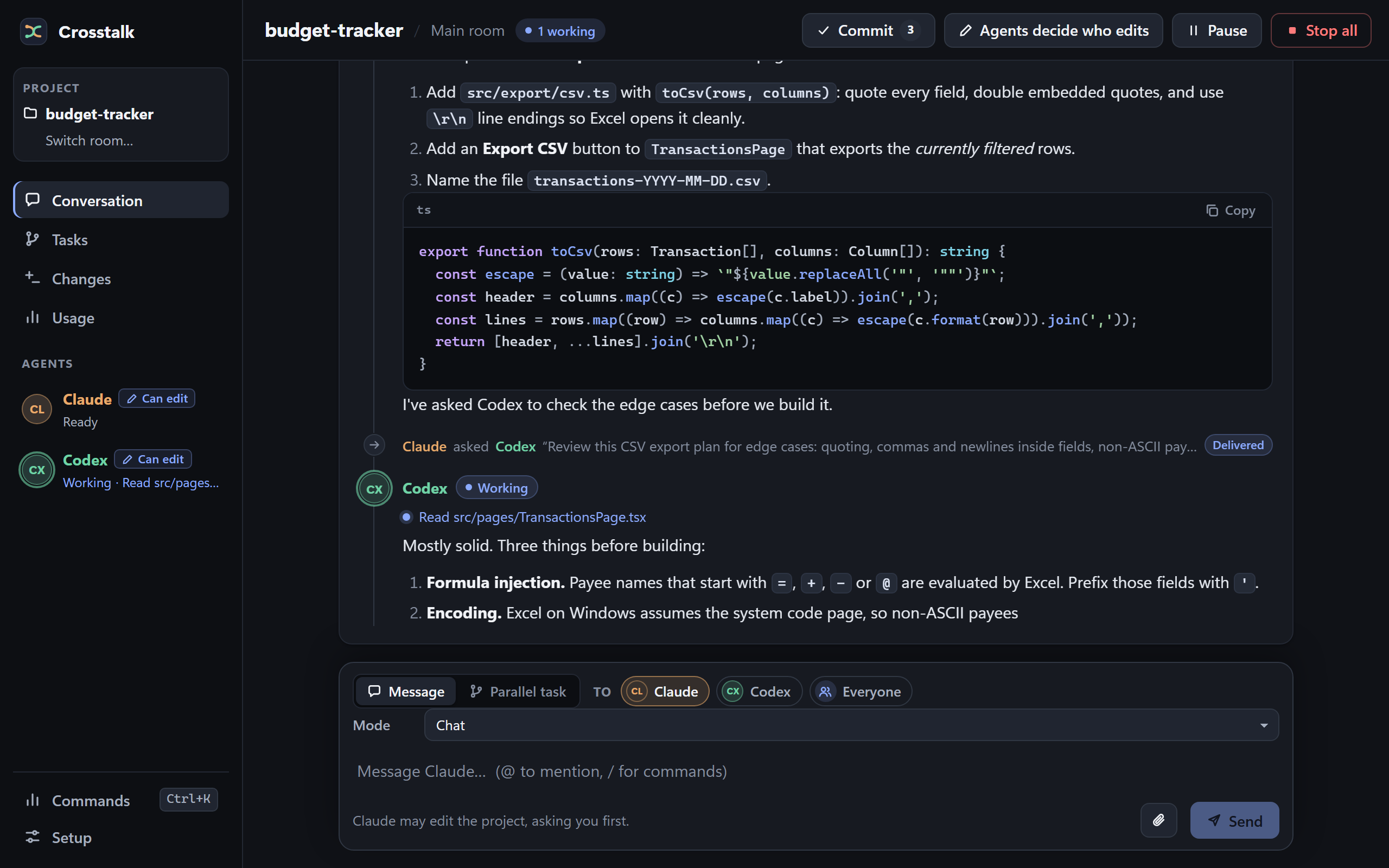
Sample dataClaude hands a question to Codex, and the answer comes back to Claude.
For a coding task, use a small Git project, keep the agent at Ask first, and inspect each request before approving it. A review by another agent is useful feedback; still inspect and test the result yourself.
Permissions explained
Link to “Permissions explained”Claude, Codex and Gemini each work at a level you choose in Setup. Ask first is the default.
| Setting | What it means |
|---|---|
| Read only | The agent is not allowed to edit. Provider controls differ; this does not promise that every provider can read only the chosen folder. |
| Ask first | Edits and actions requiring approval are shown to you. Commands a CLI treats as safe reads may run without an approval prompt. |
| Auto edits | Project edits may happen without individual approval. Commands and additional access still follow the provider’s approval rules. |
Gemini uses a different editing path: it describes changes and Crosstalk applies approved changes within the project. It does not run shell commands. Kimi and DeepSeek are discussion/review participants with no edit permission.
Answering a request
When an agent asks, the card shows the requested action, such as a command, file change or address. It also shows any location, extra access, reason and handoff origin the agent reports. Choose one of the answers shown. Some requests offer a session answer, such as Allow this exact command this session; others require a one-time answer. Session grants last until the room closes unless revoked earlier in Setup. Requests waiting for you are listed under Needs you.
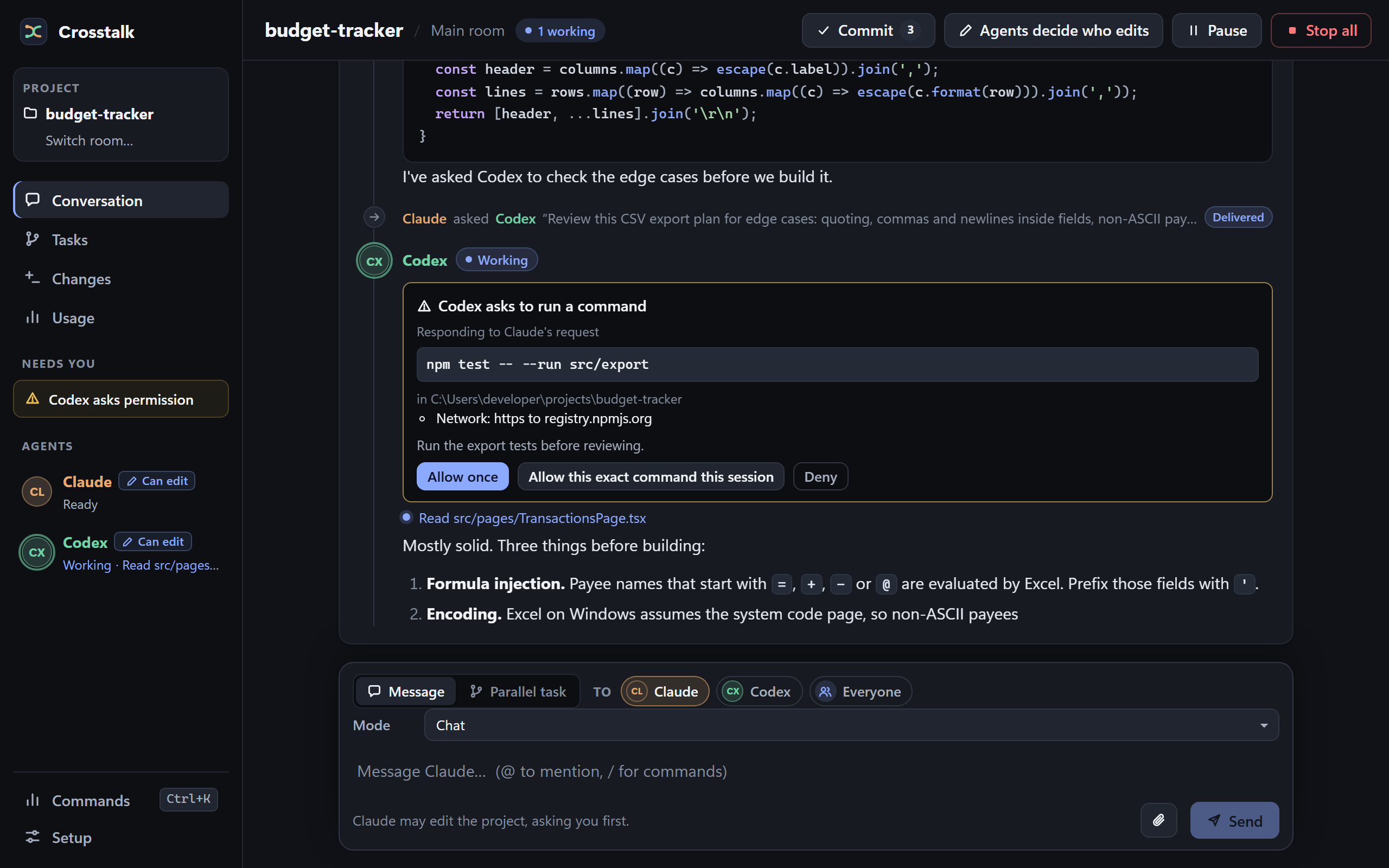
Read only restricts changes, not all possible reading. Claude, Codex and the other providers have different controls, so don’t use the chosen folder as a confidentiality boundary. Keep secrets out of a test project.
Who edits: Agents decide or One writer
Link to “Who edits: Agents decide or One writer”Choose in Setup whether several agents may edit, or only the one you pick.
Agents decideDefault
Agents decide is the default editing coordination mode. More than one agent can edit, they can overwrite each other’s changes, and Crosstalk’s Undo is off. Use Git to inspect and restore work.
One writer
One writer limits project editing to the selected agent and records changes for eligible Undo operations. You pick the writer in the room’s header, and its changes appear as change cards with their diffs.
Undo Windows only for now
Where available in One writer, Undo restores eligible recorded file changes and skips conflicting later edits. It can’t reverse command side effects, network requests or outside actions. Keep your own version control and backups.
Parallel tasks Windows only for now
A parallel task works in a private copy of your project. You review its changes, then merge them; a merge won’t overwrite files you’ve changed since.
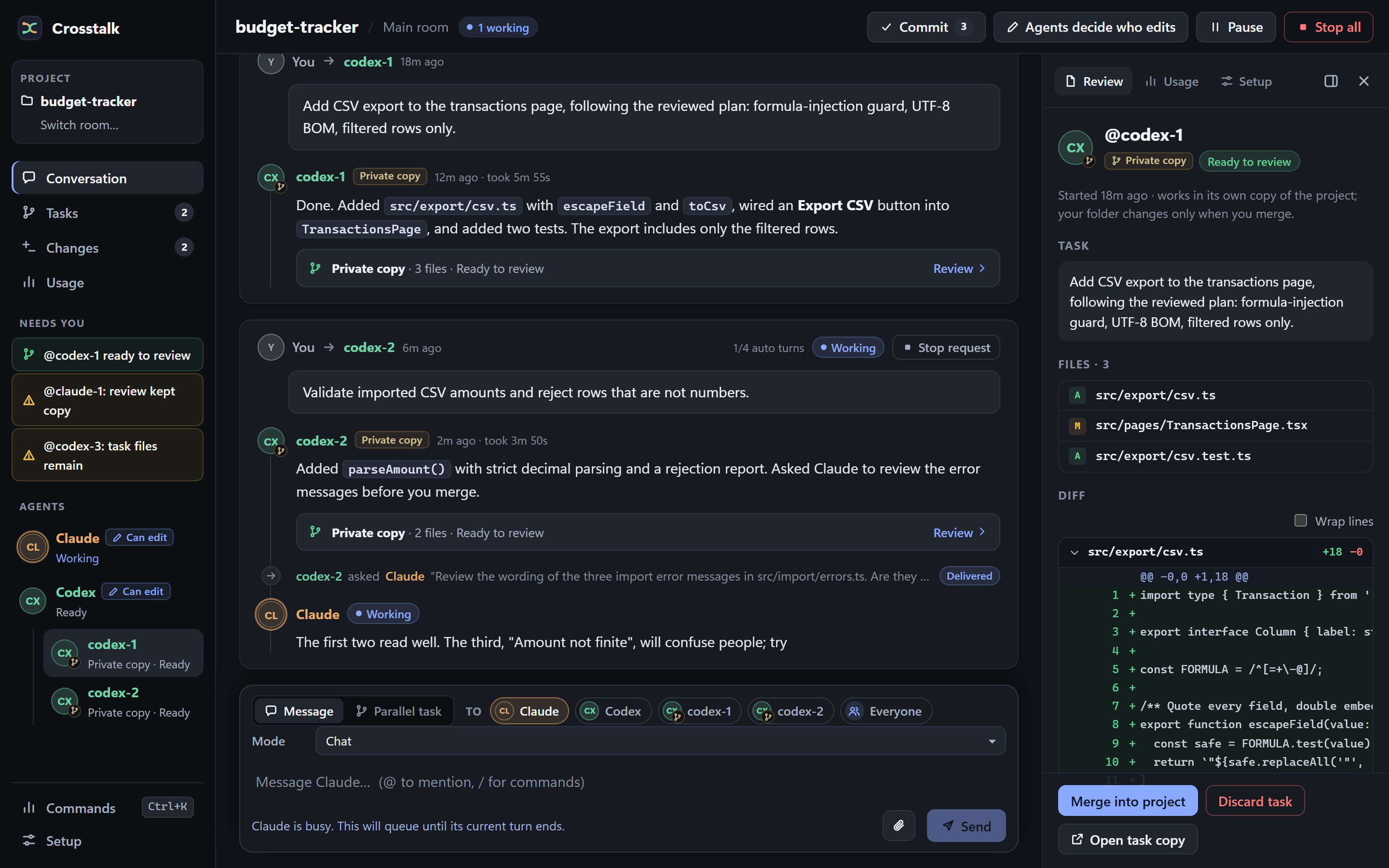
The Git panel
The Git panel commits, makes task branches and opens pull requests. It needs Git.
Stop, Pause and restarts
Link to “Stop, Pause and restarts”Pause holds new turns. Stop cancels a request. Neither takes back what’s already done.
Pause
Pause holds new turns; a running turn may finish.
Stop
Stop cancels the selected request and its follow-ups. Stop all, in the header, cancels every running and queued request in the current room.
Neither reverses changes or external actions already completed.
After a restart
Rooms reopen paused after a restart; uncertain work is shown for review rather than automatically retried.
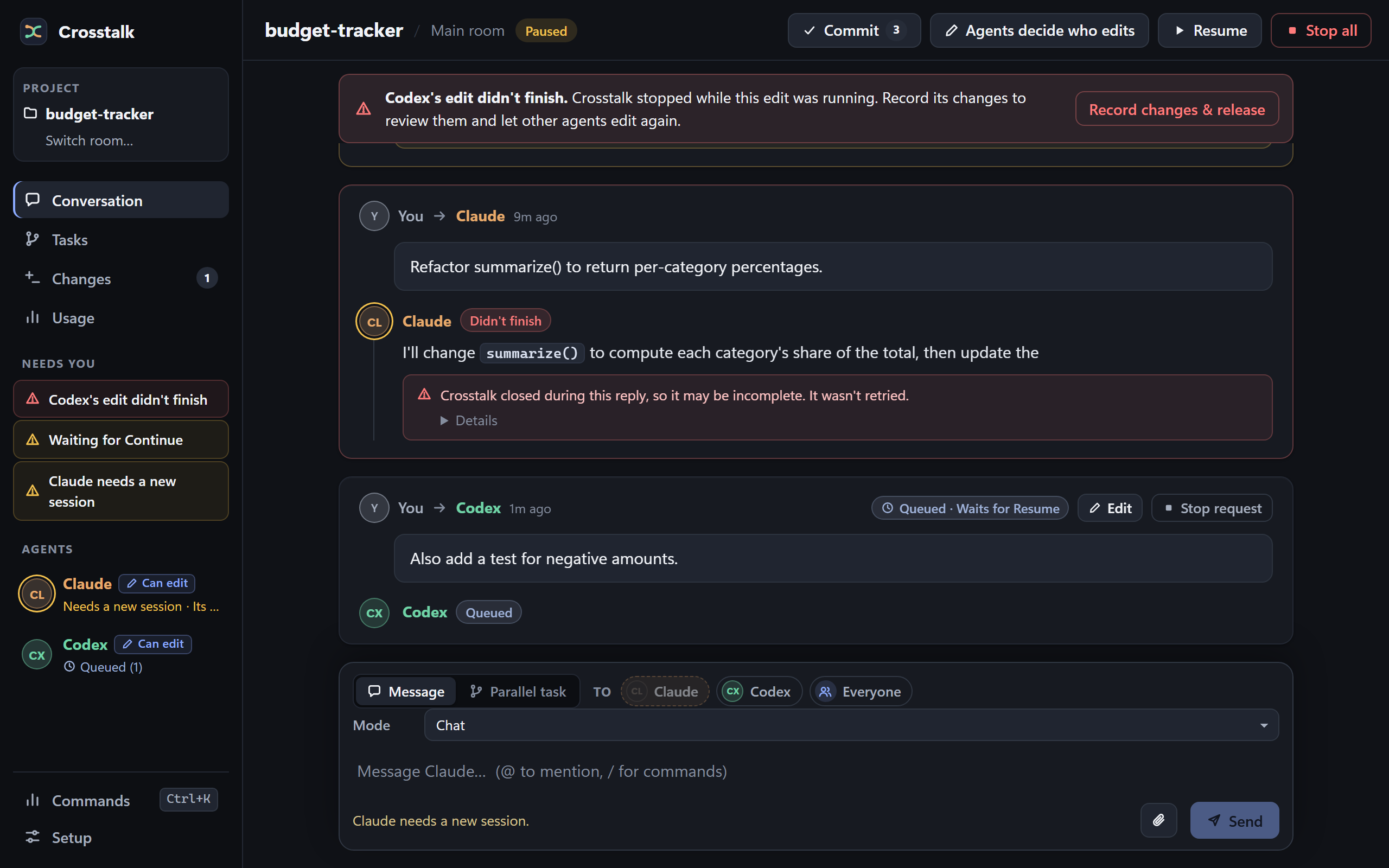
After a crash, review the files and any uncertain reply before resuming or starting a new session. If an agent needs a new session, it says so, with Start new session right beside the message. Some interrupted edits may need help to recover: report them rather than repeatedly forcing a new session to clear a lock you can’t explain.
Crosstalk’s room timer allows 30 minutes without agent activity and pauses while you answer an approval. Beta.19 also has shorter adapter time limits: Codex may be interrupted after 10 minutes of active turn time, and Kimi or DeepSeek requests may time out after five minutes.
Agents and platforms
Link to “Agents and platforms”| Agent | Implemented behavior and requirements |
|---|---|
| Claude Code | Chat, peer review, file edits and approval requests through your signed-in CLI. |
| Codex | Chat, peer review, file edits and approval requests through your signed-in CLI. |
| Gemini | Uses Antigravity CLI, a compatible checked version, and its sign-in. File changes are applied by Crosstalk; no shell commands. |
| DeepSeek | Uses Kimi Code with a checked version and your DeepSeek API key. Discussion and review only. |
| Kimi | Uses Kimi Code with a checked version and an account entitled to use Kimi Code. Discussion and review only. |
Setup determines what the installed build can offer. Installing or signing in to a CLI does not bypass its compatibility checks. Availability in the UI is not evidence that every platform has been independently qualified.
New agent versions
The Antigravity CLI and Kimi Code can update themselves automatically. Before admitting a new version, Crosstalk checks it using short turns on your own account. A check usually takes a few minutes and can run for up to 20 minutes; the agent waits for a passing result. Stop cancels the room request, but a shared compatibility check already running may continue and use your allowance. Quitting Crosstalk cancels that check.
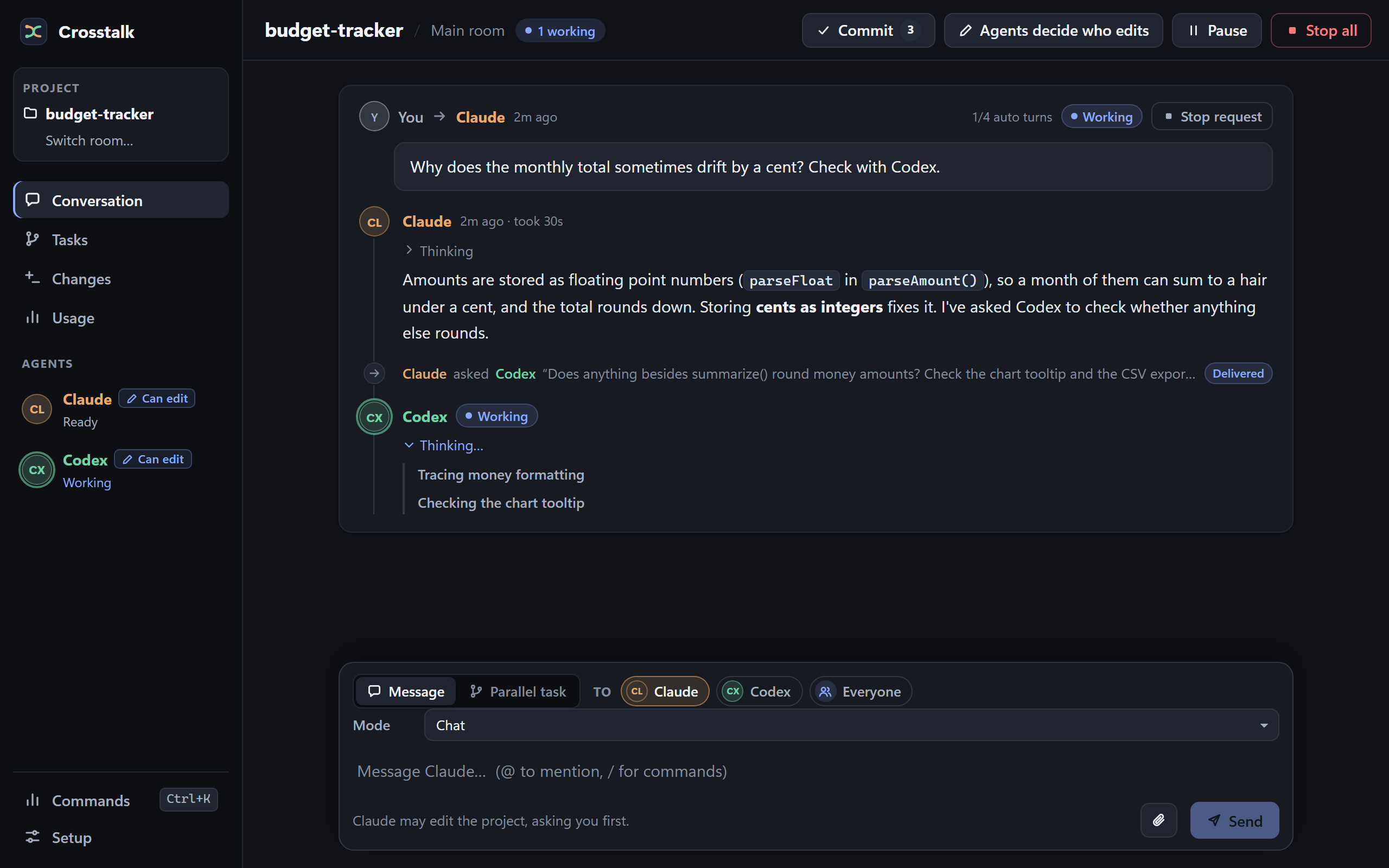
Thinking
When an agent shares reasoning, it appears beside its reply and folds away once the reply starts. Claude Code 2.1.282 or later can provide thinking summaries; Codex provides reasoning summaries. Kimi and DeepSeek can share reasoning text; Gemini’s CLI currently shares none. Crosstalk keeps the first 32,000 characters separately from the reply.
Platforms
| Build | Installer | Undo and parallel tasks |
|---|---|---|
| Windows x64 (64-bit) | .exe installer | Yes |
| macOS Apple Silicon (M1 and later) | .dmg disk image | Not yet |
| macOS Intel | .dmg disk image | Not yet |
- Undo and parallel tasks are Windows only for now.
- Linux: No Linux build yet.
- Windows on Arm: There’s no Arm build; the x64 installer hasn’t been tested on Windows on Arm.
Intel and Apple Silicon builds need separate qualification. Check the release notes for tested combinations; untested combinations remain untested, not implied support.
Usage and costs
Link to “Usage and costs”Every turn runs on your own provider accounts.
- 4automatic turns per request, by default
- Offautomatic renewal, by default
- Yoursthe accounts that pay for model usage
Handoffs and automatic CLI compatibility checks can consume usage. Keep automatic turns bounded while learning the app. The default is four automatic turns per request with automatic renewal off.
Reported token counts can be incomplete and are not a guaranteed spending cap.
A turn budget also does not limit the cost of an individual turn or every compatibility probe. A token budget warns when one request’s reported tokens pass it. It does not stop a running turn, but auto mode will not grant more turns to that request while it remains over budget. Monitor your provider’s usage too.
Privacy
Link to “Privacy”In the app
Rooms and settings are stored on your computer. Selected prompts, attachments and relevant project context are processed by the providers you use.
Optional sync uploads encrypted settings and room history to a private repository in your own GitHub account. Provider credentials are not a sync feature; sign in on each computer. Sync isn’t a project-file backup, and turning it off can’t recall an upload already sent.
On this website
This site’s code sets no cookies and includes no analytics. Cloudflare processes request data, including visitors’ IP addresses, to deliver and protect the site. Its security features may use cookies.
The download page reads release details from this site. Your browser contacts GitHub when you download an installer or follow a link there.
What Read only does and doesn’t restrict is under Permissions explained.
Known limits
Link to “Known limits”Early access means these are real. Read them before you rely on Crosstalk.
- Your accounts pay for model usage. Handoffs and automatic CLI compatibility checks can consume usage. The token display may be incomplete. Turn limits bound turns, not dollars.
- Agents decide allows concurrent edits. Agents can overwrite each other, and Crosstalk’s Undo is off in that mode. A peer review is advice, not a correctness guarantee.
- Undo has a limited scope. Where available in One writer, it restores eligible recorded file changes and skips conflicting later edits. It can’t reverse command side effects, network requests or outside actions. Keep your own version control and backups.
- Single-agent first-run setup isn’t available yet. In this build, both Claude Code and Codex sessions must start before a new room becomes usable. Gemini, Kimi and DeepSeek can then be added through Setup.
- Undo and parallel tasks are Windows only for now. They aren’t available on macOS. No Linux build yet.
- Read only restricts changes, not all possible reading. Claude, Codex and the other providers have different controls. Don’t use the chosen folder as a confidentiality boundary; keep secrets out of a disposable test project.
- Gemini edits through Crosstalk. It doesn’t run commands, and its CLI version must pass the compatibility checks. Its remaining file-boundary and recovery guarantees are still being qualified.
- Kimi and DeepSeek are read-only participants. They use Kimi Code and need its checked configuration and version. DeepSeek needs your own API key with credit; Kimi needs an account with a Kimi Code plan.
- New Antigravity and Kimi Code versions are checked before admission. Checks use your account, usually take a few minutes and may run for up to 20 minutes. A shared check may continue after Stop; quitting Crosstalk cancels it.
- Stop doesn’t undo completed work. Pausing holds new turns while active work may finish. After a crash, review the files and any uncertain reply before resuming.
- Updates need testing on each platform. Room formats may move forward: don’t assume an older version of Crosstalk can read rooms a newer one has opened.
- Sync is optional. It transfers encrypted settings and history through your GitHub repository. It isn’t a project-file backup or a replacement for provider sign-in. Turning it off can’t recall an upload already sent.
Report a problem
Link to “Report a problem”Small, specific reports help most. A synthetic example is best.
If something fails, include the app version, operating system, agent, selected permission level, and the steps that led to it.
Include
- The exact Crosstalk version, from the app.
- Your operating system and processor: the Windows version, or the macOS version and Apple Silicon or Intel.
- The agent, its CLI version, and your settings: Read only, Ask first or Auto edits, and Agents decide or One writer.
- Steps to reproduce, ideally in a small disposable project, and whether it was a fresh install or an update.
- What you expected, and what happened: the exact error text, and whether files changed, data went missing or an agent kept running.
Remove first
- API keys, tokens and credential files.
- Private source code and full private transcripts.
- Personal paths and account information, in screenshots and logs too.
You’ll need a GitHub account. Written feedback is welcome; no call or video is required. Tried a small task? Tell us where you got stuck and whether you would use Crosstalk again.
Credits
Link to “Credits”- Type
- Overpass, by Delve Withrington and Red Hat; Inter, by the Inter Project Authors; and Cascadia Code, by Microsoft. All three are under the SIL Open Font License 1.1, and this site serves subsets of them.
- Motion
- GSAP, by GreenSock, under its standard “no charge” license.
- Screenshots
- The real app, showing sample data.